
-
For Resellers
-
-
For Clients
-
-
WHMCS Integration
Encoder Settings
Encoder settings refer to the configuration options that allow you to connect a live video channel using any encoder with MojoCP’s video platform. With encoder settings, you can set up the necessary parameters such as bitrate, resolution, codec, and other parameters that are required to successfully broadcast your live video feed to the MojoCP platform. By setting up the encoder settings, you can ensure that your live video stream is optimized for the best quality and performance, and that it is compatible with the MojoCP platform. Overall, encoder settings are a key component of successfully setting up and broadcasting a live video feed through MojoCP.
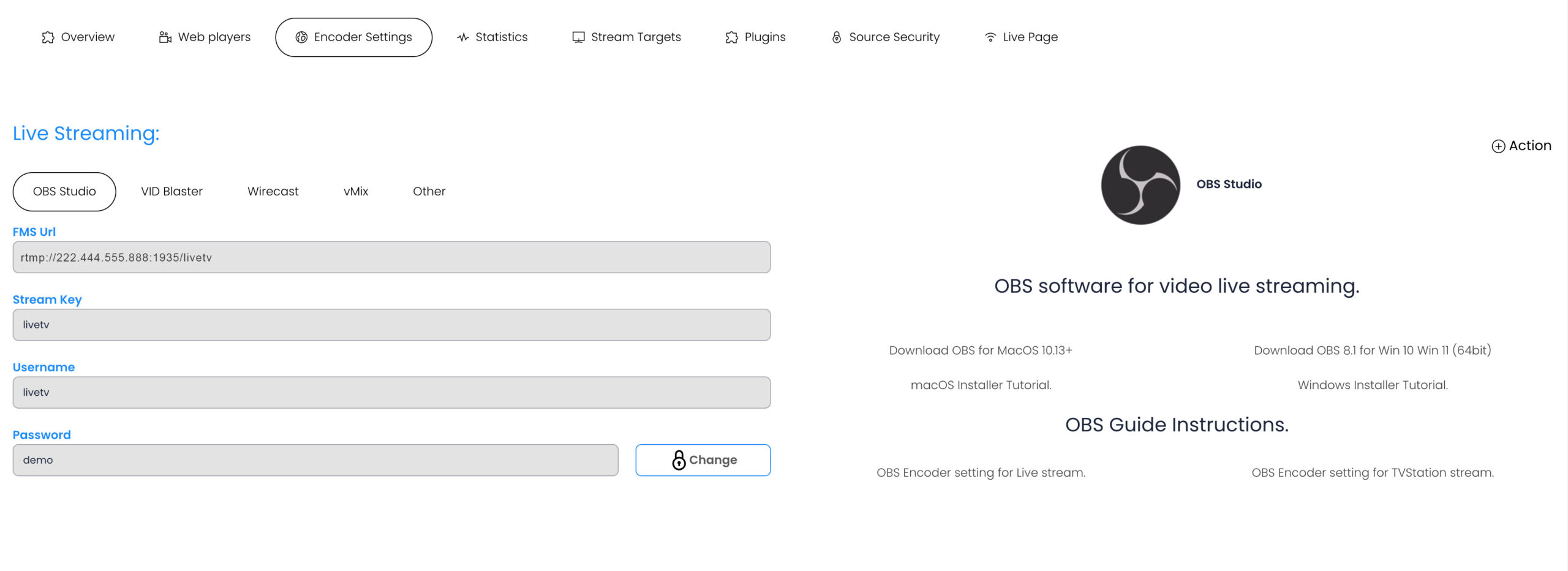
RTMP authentication
Some online services tend to use rtmp Servers like Wowza and similar. These servers often need you to authenticate yourself with your username and password.
- From MojoCP Dashboard select the Encoder Settings Tab.
- FMS RTMP:// URL - This is your rtmp://222.444.555.888:1935/livetv url for your live streaming.
- Stream Key Copy the information available on the Streaming Key.
- RTMP authentication username.
- Password (RTMP authentication).
More Videos:
Video tutorials: Software for Live Streaming. Video Encoder Software
