
-
For Resellers
-
-
For Clients
-
-
WHMCS Integration
Stream to Shoutcast
Shoutcast Icecast Stream Target is a powerful streaming solution that enables Mojocp to deliver high-quality live audio content directly to listeners around the world. With Shoutcast Icecast Stream Target, Mojocp can help our clients expand their reach and engage with their audience through the power of live streaming.
As a trusted partner of both Shoutcast and Icecast, Mojocp has the expertise to help our clients deliver high-quality audio content that is optimized for these popular platforms. Our team of experts works closely with our clients to develop a customized streaming plan, including setting up microphones, optimizing network settings, and managing the entire streaming process.
Mojocp’s Shoutcast Icecast Stream Target solution is designed to provide the best possible listening experience for our clients’ audience. We use advanced streaming technology to deliver high-quality audio to listeners on any device, regardless of their network conditions. Additionally, we provide detailed analytics and reporting to help our clients track the success of their live audio content on Shoutcast and Icecast.
Using Shoutcast Icecast Stream Target, Mojocp can help our clients expand their audience and reach new listeners. By leveraging the social features of these platforms, our clients can engage with their audience in real-time, answer questions, and build a more intimate connection with their listeners.
Overall, Shoutcast Icecast Stream Target is an essential tool for Mojocp and our clients who want to increase engagement with their audience and reach a wider audience on the popular streaming platforms for live audio content. With the ability to stream high-quality live audio content to Shoutcast and Icecast, Mojocp can help our clients take their online presence to the next level and achieve their goals.
This article explains how to configure Shoutcast on MojoCP so that you can send a single audio live stream to the Shoutcast Live network for distributed delivery. Existing stream targets are not active until this feature is enabled.
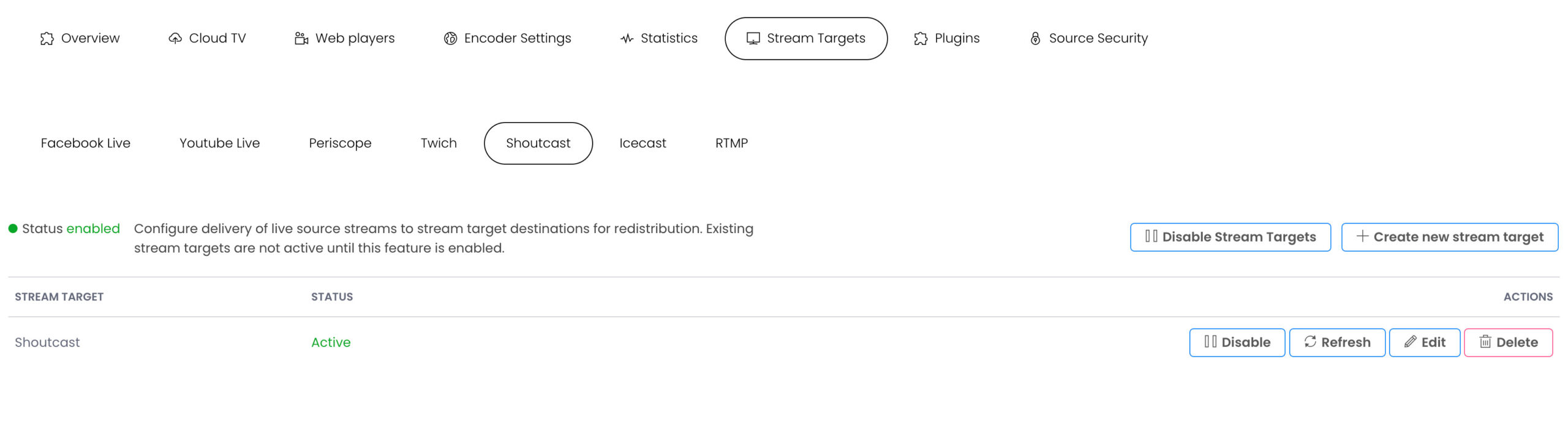
Configure Shoutcast stream target
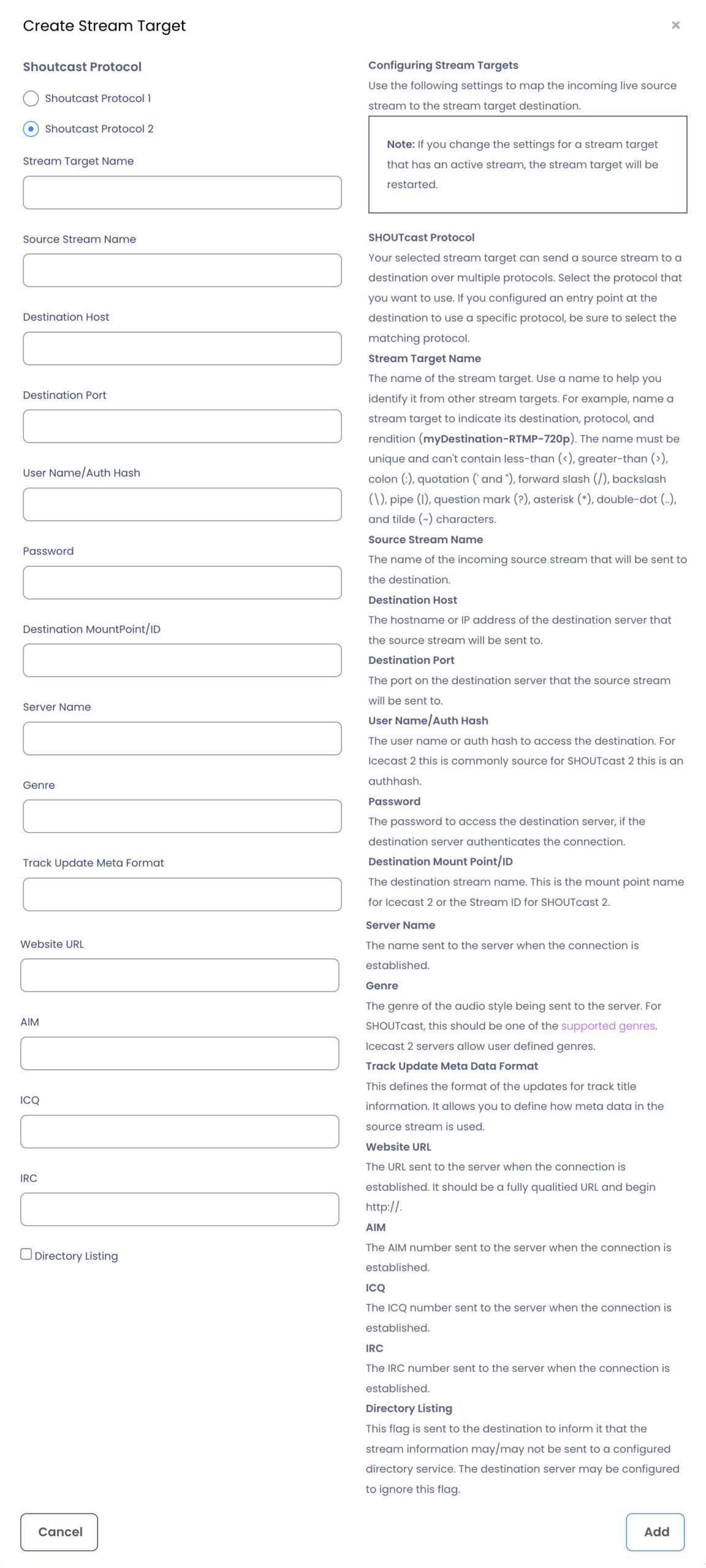
Use the following settings to map the incoming live source stream to the stream target destination.
Note: If you change the settings for a stream target that has an active stream, the stream target will be restarted.
- 1 From MojoCP click on the Stream Target Tab.
- 2 Enable Stream Targets.
- 3 Create New Stream Target.
- 4 SHOUTcast Protocol
Your selected stream target can send a source stream to a destination over multiple protocols. Select the protocol that you want to use. If you configured an entry point at the destination to use a specific protocol, be sure to select the matching protocol. - 5 Stream Target Name
Enter the Stream Target name in the dialog box, specify a unique name target as two stream targets can’t have the same name. Use a name to help you identify it from other stream targets. For example, name a stream target to indicate its destination, protocol, and rendition (My-Shoutcast). The name must be unique and can’t contain less-than (<), greater-than (>), colon (:), quotation (‘ and “), forward slash (/), backslash (\), pipe (|), question mark (?), asterisk (*), double-dot (..), and tilde (~) characters. - 6 Source Stream Name
The Application name of the incoming source stream that will be sent to the destination. This can be found under the Overview Tab “Application Name” - 7 Destination Host
The SHOUTcast of your hostname or IP address of the destination server that the source stream will be sent to. eg: myhost-.com- or-ip – without http / https - 8 Destination Port
The SHOUTcast port on the destination server that the source stream will be sent to. - 9 User Name/Auth Hash
The user name or auth hash to access the destination. For SHOUTcast 2 this is an authhash. Note that User Name is only shown and needed for SHOUTcast 2 connections. - 10 Password
Your SHOUTcast source password to access the destination server, if the destination server authenticates the connection. - 11 Destination Mount Point/ID
The destination stream name. This is the Stream ID for SHOUTcast v2. eg: “1” - 12 Server Name
The name sent to the server when the connection is established. - 13 Genre
The genre of the audio style being sent to the server. For SHOUTcast, this should be one of the supported genres. Icecast 2 servers allow user defined genres. - 14 Track Update Meta Data Format
This defines the format of the updates for track title information. It allows you to define how meta data in the source stream is used. An example would be the following Track Update Format: {StreamTitle} {StreamArtist} - 15 Website URL
The URL sent to the server when the connection is established. It should be a fully qualitied URL and begin https://. - 16 AIM
The AIM number sent to the server when the connection is established. - 17 ICQ
The ICQ number sent to the server when the connection is established. - 18 IRC
The IRC number sent to the server when the connection is established. - 19 Directory Listing
This flag is sent to the destination to inform it that the stream information may/may not be sent to a configured directory service. The destination server may be configured to ignore this flag. - 20 Publish
Click on “Add” to publish your live on SHOUTcast.
Stream to SHOUTcast from MojoCP
More Videos:
Video tutorials: Use the stream targets to simulcast to any media platforms. Stream Targets.
