
-
For Resellers
-
-
For Clients
-
-
WHMCS Integration
Managing Existing Accounts
The “Managing Client Accounts” feature in MojoCP allows resellers to manage their clients’ accounts through an account list that provides an overview of all accounts managed by the control panel. Each account summary includes important details such as the client’s nickname, email address, and status. Resellers can easily log in to a client’s account, edit account information, or delete a client’s account entirely. This feature is accessible by clicking on the “Client” link on the left-hand side menu and is a powerful tool for managing multiple client accounts efficiently.
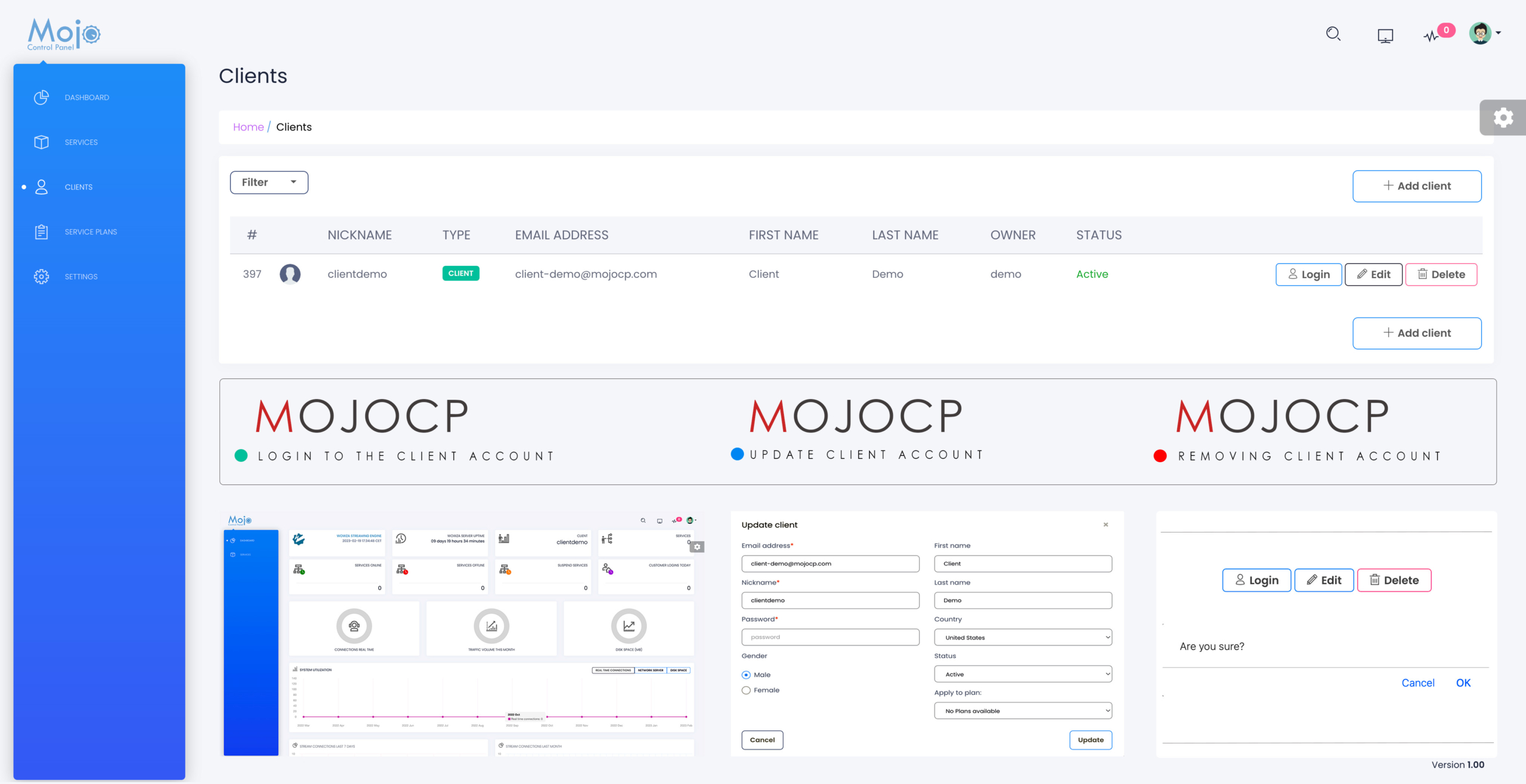
Account List.
The Account List in MojoCP provides an overview of all accounts managed by the control panel.
It includes several details about each client:
- NickName:
nickname, which is the username for their account login and FTP. - Type:
The Type field indicates the type of client account and their level of access. - Email Address:
The Email Address field displays the email of the person in charge of managing the stream, and MojoCP will automatically send notifications to this address when necessary. - First Name & Last Name:
The First Name and Last Name fields display the client’s name. - Owner:
the Owner field indicates the users who can access and manage one or more of their associated accounts. - Status:
The Status field shows whether the account is active or suspended. - Login:
The Login button is used to access the user account. - Edit:
Edit button is clicked to access the client account editor. - Delete:
Delete link is used to remove a client, and a confirmation is required before the client can be deleted.
Filtering.
As a reseller on MojoCP, you can easily filter your account list by various criteria to quickly find the clients you need to manage. Simply click the “Filter” button located on the toolbar just above the account list. From there, you can use several filter and search options to refine your results. For example, you can filter by account type, status, servers type . Additionally, you can use the search box to look for specific keywords or terms that match your criteria. These filters help you manage your clients more efficiently and make it easy to find what you need.
- By Clients:
Which displays only accounts belonging to a particular client. - By Status:
Which shows whether the account is active or suspended. - By Server Type:
Which allows resellers to find specific types of streaming servers, such as On-Demand Live, IpCamera, and more.
With the filtering function, resellers can quickly and efficiently manage their clients’ accounts on MojoCP.
